
When choosing a voice assistant ecosystem, consider your existing devices and privacy preferences. If you’re heavily invested in Apple products, Siri with HomeKit offers strong privacy controls. For Android or Google services, Google Assistant integrates well with Nest devices and Android smartphones. Amazon Alexa provides broad third-party device support, making it flexible. To guarantee smooth operation and security, weigh compatibility and privacy features carefully. Keep exploring to find out how to align your choices with your lifestyle and needs.

Turn your quiet moments into listening time
- Thousands of audiobooks, podcasts and originals
- Listen on your phone, tablet or Echo — also offline
- Cancel anytime
Key Takeaways
- Compatibility with existing devices and ecosystems is crucial for seamless integration and efficient smart home management.
- Consider privacy policies and data security features aligned with your comfort level before selecting an ecosystem.
- Ecosystems like Apple, Google, and Amazon prioritize different device compatibilities and privacy approaches.
- Starting fresh requires assessing device ecosystem preferences, privacy concerns, and long-term compatibility needs.
- Balancing device compatibility with robust privacy protections ensures a secure and functional voice assistant experience.
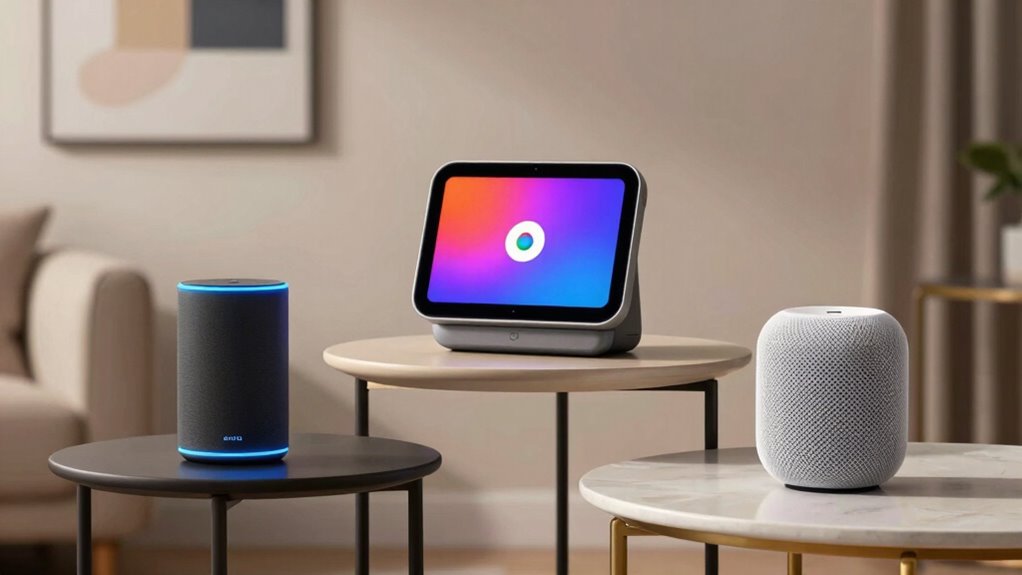
Have you ever wondered how voice assistants have become such an integral part of our daily lives? It’s impressive how seamlessly they fit into routines—whether you’re asking your smart speaker for the weather, setting reminders, or controlling smart home devices. But when it comes to choosing the right voice assistant, understanding the ecosystem around each one is essential. Your decision isn’t just about the features; it’s about how well it integrates with your existing devices and how it handles your privacy concerns.
Device compatibility is a key factor. Not all voice assistants work with every gadget, so you need to consider what devices you already own or plan to buy. If you have a lot of smart home gadgets, like smart bulbs, thermostats, or security cameras, you’ll want a voice assistant that plays nicely with them. For example, if you’re already invested in Apple products, Siri might be the obvious choice because of its compatibility with your iPhone, iPad, and HomeKit-enabled devices. On the other hand, if you’re a Google user with Nest devices and Android phones, Google Assistant will likely give you the best experience. Amazon Alexa, with its extensive third-party device support, offers a broader compatibility range, making it suitable for diverse smart home setups.
Choosing a voice assistant depends on your existing devices and smart home ecosystem compatibility.
However, device compatibility isn’t the only consideration. Privacy concerns play a significant role in how you choose your ecosystem. Voice assistants constantly listen for wake words, which means they’re always slightly on alert, raising questions about data security and privacy. You need to ask yourself how comfortable you are with your voice data being stored and possibly shared. Some ecosystems, like Apple’s, focus heavily on privacy, giving you more control over your data. Others, like Amazon or Google, collect more information to improve their services, which might be a trade-off you’re willing to accept for better features. Additionally, understanding the ecosystem’s data management policies can help you make an informed decision about your privacy. Moreover, considering the privacy features offered by each platform can further guide your choice to ensure your data remains protected. Knowing that some ecosystems prioritize data security can help you feel more confident in your decision.
Ultimately, selecting a voice assistant ecosystem comes down to balancing device compatibility with your privacy preferences. If your devices are already tied to a specific platform, sticking with that ecosystem makes sense. But if you’re starting fresh, consider how each ecosystem’s privacy policies align with your comfort level, and how well their compatible devices fit into your home. The right choice will not only streamline your interactions but also give you peace of mind, knowing your privacy is protected and your devices work smoothly together.
Apple HomeKit compatible smart home devices
As an affiliate, we earn on qualifying purchases.
As an affiliate, we earn on qualifying purchases.
Frequently Asked Questions
Can I Switch Ecosystems Without Losing My Data?
Yes, you can switch ecosystems without losing your data, but it requires careful data migration and cross-platform integration. You’ll need to export your data from your current voice assistant and import it into the new one. Many services offer tools to help with this process, ensuring your contacts, reminders, and settings transfer smoothly. Just take your time, follow the steps closely, and back up your data to avoid any loss.
Which Ecosystem Offers the Best Privacy Protections?
They say, “Trust takes years to build, seconds to break,” and when it comes to privacy, you want a system that’s trustworthy. Among ecosystems, Apple offers the best privacy protections, with strict privacy policies and robust data encryption. They minimize data collection, giving you more control. While no system is perfect, Apple’s focus on privacy makes it a safer choice if protecting your personal info matters most to you.
Are All Voice Assistants Compatible With Third-Party Devices?
Not all voice assistants are compatible with third-party devices. You’ll encounter compatibility challenges depending on the ecosystem you choose; some assistants, like Amazon Alexa, offer broader device integration, making it easier to connect various smart gadgets. Others, such as Apple’s Siri, may have more limited compatibility with third-party devices. To guarantee seamless device integration, check the compatibility lists before committing to a particular voice assistant.
How Do Ecosystem Updates Affect Voice Assistant Features?
Ecosystem updates can greatly impact your voice assistant features by enhancing voice assistant integration or introducing new functionalities. When an ecosystem update occurs, it may improve compatibility with third-party devices, expand voice commands, or fix bugs. However, it can also temporarily disrupt existing features. Staying informed about upcoming updates helps you understand potential ecosystem update impacts and guarantees you maximize your voice assistant’s capabilities.
Can I Use Multiple Voice Assistants Across Different Ecosystems?
Using multiple voice assistants across different ecosystems is like juggling flaming torches—you can do it, but it’s tricky. Interoperability challenges make cross-platform integration difficult, causing limited compatibility between systems. You may experience delays, limited functionality, or need separate apps. While some smart devices support multiple assistants, seamless use across ecosystems isn’t always guaranteed. Expect to face hurdles, but with patience, you can still enjoy diverse voice assistant features.
As an affiliate, we earn on qualifying purchases.
Conclusion
Choosing the right voice assistant is like picking the perfect puzzle piece—you want it to fit seamlessly into your ecosystem. Whether you go with Apple, Google, or Amazon, each offers unique features tailored to different lifestyles. Consider your devices and preferences carefully, and you’ll find a voice assistant that feels like an extension of yourself. When you do, your digital world becomes as smooth as silk, making everyday tasks easier and more enjoyable.
Amazon Alexa compatible smart home gadgets
As an affiliate, we earn on qualifying purchases.
As an affiliate, we earn on qualifying purchases.
As an affiliate, we earn on qualifying purchases.
Fall Picks
fall essentials
As an affiliate, we earn on qualifying purchases.