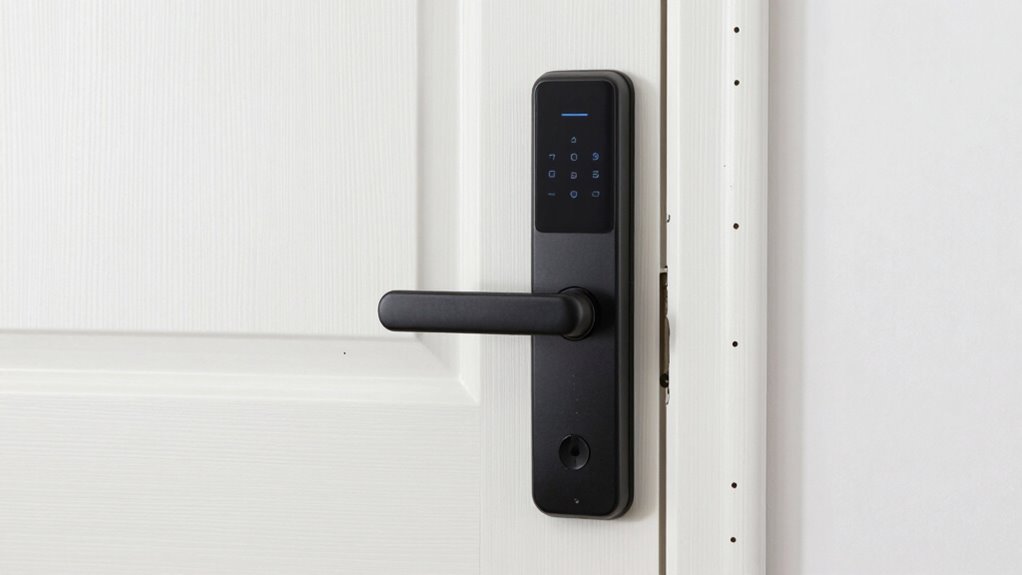
For a smart lock for apartments, my best overall pick is the eufy Security Smart Lock C220, which combines fingerprint entry with a deadbolt format that suits many standard doors. The August Wi-Fi Smart Lock is a standout for renters who want to keep their existing exterior hardware, while the Wyze Lock Bolt v2 is a simpler fingerprint option for buyers who can do without remote access. The main tradeoff is between easy installation and broader features: retrofit models can preserve a landlord-approved lock, while full-replacement models often offer more access methods but require a closer fit check. Wi-Fi, keypad, fingerprint, battery upkeep, and permission to alter the door all affect which lock makes sense. Read on for the full comparison, apartment-specific buying advice, and recommendations by buyer type.

Turn your quiet moments into listening time
- Thousands of audiobooks, podcasts and originals
- Listen on your phone, tablet or Echo — also offline
- Cancel anytime
Key Takeaways
- The eufy Security Smart Lock C220 ranks first for buyers seeking a deadbolt-format lock with fingerprint entry and app control in one unit.
- August’s retrofit design addresses a renter-specific concern: it can work with existing exterior hardware, which may help preserve the door’s original appearance and key access.
- Wi-Fi access is not universal across the lineup. Check whether a model offers built-in Wi-Fi, another connection method, or local-only features before relying on remote control.
- Fingerprint, keypad, and app access solve different problems. A keypad can help guests, fingerprints reduce code sharing, and app controls suit owners managing access from elsewhere.
- Door fit and landlord approval matter as much as smart features. Full-replacement locks and handle-integrated models may demand more careful measurement and permission than retrofit options.
| Evanshow Smart Fingerprint Door Lock with Keypad, App Control, and Lever Handle |  | Best for Apartments That Need a Lever Handle | Brand and model: Evanshow 190BT | Lock format: Lever knob | Entry methods: Fingerprint, keypad passcode, NFC card, mechanical key | VIEW ON AMAZON | See Our Full Breakdown |
| Anona Holo Wi-Fi Smart Lock with Keypad |  | Best for Straightforward Deadbolt Retrofitting | Brand and model: Anona Holo SL2001+KP2001 | Lock type: Deadbolt | Control methods: App, push button, voice | VIEW ON AMAZON | See Our Full Breakdown |
| eufy Security Smart Lock C220 Fingerprint Keyless Entry Deadbolt |  | Best Overall for Flexible Keyless Entry | Brand and model: eufy Security T8506 | Lock type: Deadbolt | Unlock methods: Fingerprint, app, keypad, physical key, Apple Watch, Alexa or Google voice assistant | VIEW ON AMAZON | See Our Full Breakdown |
| Wyze Lock Bolt v2 Fingerprint Smart Deadbolt |  | Best for Fast Fingerprint Access and Shared Codes | Brand and model: Wyze WLCKB2 | Lock type: Biometric deadbolt with keypad | Connectivity: Wi-Fi | VIEW ON AMAZON | See Our Full Breakdown |
| Philips Wi-Fi Smart Deadbolt Lock with Keyless Entry |  | Best for High-Capacity Passcodes | Brand and model: Philips DDL242X-1HW | Unlock methods: App, passcode, fingerprint, physical key, Alexa, Google Assistant | Wi-Fi and hub: Built-in 2.4 GHz Wi-Fi; no hub required | VIEW ON AMAZON | See Our Full Breakdown |
| August Wi-Fi Smart Lock (4th Generation), Silver |  | Best for Keeping Existing Keys | Model: AUG-SL05-M01-S01 | Generation: 4th | Finish: Silver | VIEW ON AMAZON | See Our Full Breakdown |
| eufy Security FamiLock C32 Fingerprint Smart Lock with Handle |  | Best for Interior Apartment Doors | Model: FamiLock C32 (T85L1) | Access methods: Fingerprint, PIN, physical key | Fingerprint unlock speed: 0.3 seconds | VIEW ON AMAZON | See Our Full Breakdown |
| SwitchBot Lock Ultra Smart Lock with Keypad and Fingerprint |  | Best for Multiple Entry Methods | Model: W5600000 | Control methods: App, touch, voice | Fingerprint capacity: Up to 100 fingerprints | VIEW ON AMAZON | See Our Full Breakdown |
| ULTRALOQ Bolt SE Wi-Fi Smart Deadbolt with Fingerprint Access and Matter over Thread | 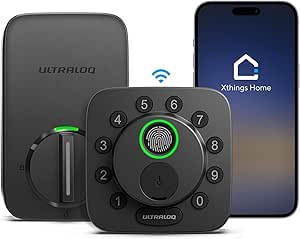 | Best for Full Deadbolt Replacement | Model: Bolt SE | Access methods: Fingerprint, passcode, smartphone app, web portal, shared eKeys, voice control, two mechanical keys | Fingerprint capacity: Up to 50 | VIEW ON AMAZON | See Our Full Breakdown |
| Philips 3000 Series WiFi Smart Deadbolt Retrofit Lock with Fingerprint Keypad |  | Best Retrofit with Fingerprint and Passcode | Model: DDL230X-1HWP-B-2 | Lock type: Wi-Fi smart deadbolt retrofit lock | Connectivity: 2.4 GHz Wi-Fi; no hub required | VIEW ON AMAZON | See Our Full Breakdown |
| smart lock for apartment | Connectivity | Brand and model | Battery | Model |
|---|---|---|---|---|
| Evanshow Smart Fingerprint Doo | App control; Wi-Fi and voice control require a separate gateway | Evanshow 190BT | — | — |
| Anona Holo Wi-Fi Smart Lock wi | — | Anona Holo SL2001+KP2001 | 4 AA batteries; stated 4–6 months in standard Wi-Fi mode | — |
| eufy Security Smart Lock C220 | Built-in Wi-Fi | eufy Security T8506 | 8 AA batteries; up to 8 months stated | — |
| Wyze Lock Bolt v2 Fingerprint | Wi-Fi | Wyze WLCKB2 | 8 AA batteries; up to 8 months stated | — |
| Philips Wi-Fi Smart Deadbolt L | — | Philips DDL242X-1HW | AA alkaline (LR6); not included | — |
| August Wi-Fi Smart Lock | Built-in Wi-Fi, 2.4 GHz or 5 GHz | — | — | AUG-SL05-M01-S01 |
| eufy Security FamiLock C32 Fin | Built-in 2.4 GHz Wi-Fi | — | — | FamiLock C32 (T85L1) |
| SwitchBot Lock Ultra Smart Loc | — | — | — | W5600000 |
| ULTRALOQ Bolt SE Wi-Fi Smart D | 2.4 GHz Wi-Fi; Matter over Thread | — | — | Bolt SE |
| Philips 3000 Series WiFi Smart | 2.4 GHz Wi-Fi; no hub required | — | Two CR123A batteries included | DDL230X-1HWP-B-2 |
More Details on Our Top Picks
Evanshow Smart Fingerprint Door Lock with Keypad, App Control, and Lever Handle
I’d put the Evanshow on the shortlist when an apartment door needs a replacement lever lock rather than a deadbolt add-on. Fingerprint, keypad, NFC card, and physical-key entry give household members several ways in, while the app can manage temporary or permanent access and show entry logs. Its no-drill, no-wiring installation may suit renters who have permission to change the lock but want to avoid a more involved install. Compared with the deadbolt-focused eufy C220, this model’s lever format is its main distinction, not built-in remote connectivity: Wi-Fi and voice control require a separate gateway. I’d also treat initial setup as a security step, since an administrator fingerprint must be registered before other fingerprints can unlock it. The indoor-use designation and gateway add-on make it less appealing for buyers seeking weather exposure or ready-to-use remote access.
Pros:- Offers fingerprint, keypad, NFC card, and mechanical-key entry.
- App supports temporary or permanent access and entry logs.
- Auto-lock and silent mode are included.
- Installs without drilling or wiring.
Cons:- Wi-Fi and voice control require a separately purchased gateway.
- An administrator fingerprint must be registered before use to prevent unrestricted fingerprint access.
- USB emergency power does not recharge the internal batteries.
Best for: Apartment residents replacing a compatible wooden-door lever lock who want fingerprint, code, card, and key access without drilling or wiring.
Not ideal for: Renters who cannot change the existing lever hardware, or buyers who want remote Wi-Fi control without purchasing a separate gateway.
- Brand and model:Evanshow 190BT
- Lock format:Lever knob
- Entry methods:Fingerprint, keypad passcode, NFC card, mechanical key
- Door thickness:1.18–1.97 inches
- Hand orientation:Reversible
- Connectivity:App control; Wi-Fi and voice control require a separate gateway
- Emergency power:USB port for an external power bank
- Use and finish:Indoor use; matte black metal
Our verdict“Choose the Evanshow if your apartment needs a lever-style replacement with several entry options and you can manage setup and gateway requirements.”
Anona Holo Wi-Fi Smart Lock with Keypad
The Anona Holo makes the most sense for apartment residents who already have a compatible single-cylinder deadbolt and want app access without replacing the outside hardware. Its keypad supports family and guest codes, including one-time access, while Alexa and Apple HomeKit support adds voice control. Door-status detection and alerts for jams or a door left open offer useful feedback when leaving an apartment unattended. Compared with the Philips Wi-Fi Smart Deadbolt, the Anona’s appeal is its inside-mounted, screwdriver installation; the Philips instead offers fingerprint entry and a larger stated passcode capacity. The tradeoff here is a narrower fit: compatibility is described for most single-cylinder deadbolts, not every apartment lock. I’d also plan for regular battery changes, since its four AA batteries are stated to last 4–6 months in standard Wi-Fi mode.
Pros:- Supports app, passcode, and voice control through Alexa and Apple HomeKit.
- Allows temporary and one-time guest passcodes.
- Auto-lock and alerts for jams or a door left open add useful status feedback.
- Installs on the inside of compatible deadbolts with a screwdriver.
Cons:- Compatibility is specified for most single-cylinder deadbolts, so other lock setups may not fit.
- Four AA batteries are stated to last 4–6 months in standard Wi-Fi mode.
- Passcode is the listed unlock method; fingerprint entry is not listed.
Best for: Apartment residents with a compatible single-cylinder deadbolt who want guest passcodes, app control, and Alexa or Apple HomeKit integration.
Not ideal for: People with a non-compatible lock format or those who want fingerprint entry or a longer stated battery interval.
- Brand and model:Anona Holo SL2001+KP2001
- Lock type:Deadbolt
- Control methods:App, push button, voice
- Unlock method:Passcode
- Smart home compatibility:Alexa, Apple HomeKit
- Installation:Inside of door; screwdriver installation
- Battery:4 AA batteries; stated 4–6 months in standard Wi-Fi mode
- Dimensions and weight:3.6 x 3.7 x 6.4 inches; 0.79 kg
Our verdict“Pick the Anona Holo for a compatible existing deadbolt when guest codes and voice control matter more than fingerprint access.”
eufy Security Smart Lock C220 Fingerprint Keyless Entry Deadbolt
I’d rank the eufy C220 first for apartment buyers who want several ways to unlock without adding a separate connectivity bridge. It combines fingerprint, keypad, app, physical key, Apple Watch, and voice-assistant access, while built-in Wi-Fi supports remote control. That flexibility helps households avoid relying on one method, and its up-to-eight-month battery life is a useful stated interval for a Wi-Fi lock, though actual use can vary. Compared with the keypad-focused Anona Holo, the C220 adds biometric and physical-key options; unlike the lever-format Evanshow, it is a deadbolt and must suit the apartment’s existing door preparation. IP53 water resistance and BHMA Grade 3 certification add useful context for buyers checking exposure and security specifications. The tradeoff is eight AA batteries and compatibility limited to most standard deadbolts, so it is not a universal renter-friendly fit.
Pros:- Provides six listed unlocking methods, including fingerprint, physical key, Apple Watch, and voice assistant.
- Built-in Wi-Fi enables remote app control without a bridge.
- Battery life is stated as up to eight months.
- Includes IP53 water resistance and BHMA Grade 3 certification.
Cons:- Requires eight AA batteries, and actual battery life varies with use.
- Designed to fit most standard deadbolts, not every apartment lock format.
- A deadbolt replacement will not suit buyers who need a lever-style lock.
Best for: Apartment households with a compatible standard deadbolt that want fingerprint entry, remote control, and several backup access methods in one lock.
Not ideal for: Renters who need a lever-style replacement, cannot alter their deadbolt, or want to minimize the number of AA batteries required.
- Brand and model:eufy Security T8506
- Lock type:Deadbolt
- Unlock methods:Fingerprint, app, keypad, physical key, Apple Watch, Alexa or Google voice assistant
- Connectivity:Built-in Wi-Fi
- Battery:8 AA batteries; up to 8 months stated
- Water resistance:IP53
- Security certification:BHMA Grade 3
- Installation:Approximately 15 minutes; compatible with most standard deadbolts
Our verdict“Choose the eufy C220 if your apartment has a compatible deadbolt and you value multiple entry methods plus built-in remote access.”
Wyze Lock Bolt v2 Fingerprint Smart Deadbolt
The Wyze Lock Bolt v2 is a strong fit for apartment households that want quick fingerprint entry and a sizable roster of individual users. The stated unlock time is about 0.5 seconds, and the lock can hold up to 50 keypad codes or fingerprints, which can make access management easier for roommates or recurring visitors. Built-in Wi-Fi allows remote management through the Wyze app, while auto-lock, tamper alarms, backup keys, and USB-C emergency power cover common access concerns. Compared with the eufy C220, the Wyze highlights a defined 50-user capacity and emergency USB-C power; the eufy lists more unlock methods, including Apple Watch and voice assistants. The Wyze’s remote features depend on Wi-Fi, and its battery interval is stated as up to eight months, so I’d weigh connectivity reliability and battery upkeep against its straightforward biometric focus.
Pros:- Fingerprint unlocking is stated to take about 0.5 seconds.
- Supports up to 50 keypad codes or fingerprints.
- Built-in Wi-Fi enables remote management through the Wyze app.
- Includes auto-lock, tamper alarms, backup keys, and USB-C emergency power.
Cons:- Remote app control depends on Wi-Fi connectivity.
- Battery life is stated as up to eight months and will depend on use.
- The listed access features are less varied than the eufy C220’s six unlocking methods.
Best for: Roommates or apartment households that want rapid fingerprint entry and room for multiple assigned codes or fingerprints.
Not ideal for: Buyers who need remote access during Wi-Fi outages or want a broader set of listed unlocking methods, such as Apple Watch access.
- Brand and model:Wyze WLCKB2
- Lock type:Biometric deadbolt with keypad
- Connectivity:Wi-Fi
- Fingerprint and keypad capacity:Up to 50 codes or fingerprints
- Battery:8 AA batteries; up to 8 months stated
- Emergency power:USB-C
- Weather resistance:IP53
- Durability certification:BHMA2
Our verdict“Choose the Wyze if fast fingerprint access and capacity for many household users matter more than a wider range of entry methods.”
Philips Wi-Fi Smart Deadbolt Lock with Keyless Entry
I’d favor the Philips Wi-Fi Smart Deadbolt for apartment residents who regularly need to issue and manage many entry codes. Its capacity for up to 100 custom passcodes, including temporary or scheduled codes, suits households with frequent visitors or service access. Built-in 2.4 GHz Wi-Fi supports remote access, activity alerts, access history, and voice control through Alexa or Google Assistant, with no hub required. Compared with the Anona Holo, Philips adds fingerprint entry and a much larger stated code capacity; compared with the eufy C220, it offers more passcodes but does not list Apple Watch access. Its 1⅜–2-inch door compatibility is clearly specified, which helps buyers check fit before ordering. The compromises are practical: AA alkaline batteries are not included, it only supports 2.4 GHz Wi-Fi, and there is no door sensor included.
Pros:- Supports up to 100 custom passcodes, including temporary or scheduled codes.
- Built-in Wi-Fi enables remote access without an extra hub.
- Offers app, passcode, fingerprint, physical-key, Alexa, and Google Assistant access.
- Includes auto-lock, activity alerts, access history, and Away Mode.
Cons:- Wi-Fi is limited to 2.4 GHz.
- AA alkaline batteries are required and are not included.
- A door sensor is not included.
Best for: Apartment households, hosts, or caregivers who need to assign many custom, temporary, or scheduled passcodes and want remote access without a hub.
Not ideal for: People whose network relies on 5 GHz Wi-Fi, who want a door sensor in the box, or whose door falls outside the stated thickness range.
- Brand and model:Philips DDL242X-1HW
- Unlock methods:App, passcode, fingerprint, physical key, Alexa, Google Assistant
- Wi-Fi and hub:Built-in 2.4 GHz Wi-Fi; no hub required
- Passcode capacity:Up to 100 custom passcodes
- Door thickness:1⅜–2 inches (38–50 mm)
- Auto-lock timer:10–180 seconds
- Battery:AA alkaline (LR6); not included
- Door sensor:Not included
Our verdict“Choose the Philips if managing a large number of scheduled or temporary codes is your priority and your door and Wi-Fi match its requirements.”
August Wi-Fi Smart Lock (4th Generation), Silver
I’d choose the August Wi-Fi Smart Lock when an apartment’s existing deadbolt and exterior hardware need to stay untouched. It mounts on the inside, so residents can keep using their current keys and the landlord-facing exterior remains unchanged—an advantage over the ULTRALOQ Bolt SE, which replaces the deadbolt. Built-in Wi-Fi supports remote locking, door-status checks, guest access, and several major smart-home platforms without a separate hub. That makes it a flexible fit for renters with permission to add an interior device, though the lock still requires a compatible single-cylinder deadbolt and a reliable Wi-Fi connection. There’s no included keypad, so visitors without app access still need a key or another access arrangement. I’d rank it ahead of full-replacement locks for hardware preservation, but below keypad-equipped choices for code-based entry.
Pros:- Installs on the interior and preserves existing keys and exterior hardware.
- Built-in Wi-Fi supports remote locking, unlocking, and door-status checks.
- Guest access and compatibility with Alexa, Google Assistant, Apple HomeKit, and SmartThings add flexibility.
- Optional auto-unlock and auto-lock can reduce routine app use.
Cons:- Works only with most single-cylinder deadbolts, so door compatibility must be checked.
- Keypad for passcode entry is sold separately.
- Remote features depend on a smartphone and Wi-Fi connection.
Best for: Apartment renters or owners who want remote control and guest access while keeping a compatible existing deadbolt, exterior trim, and keys.
Not ideal for: People whose door has an incompatible deadbolt, who need keypad entry included, or who cannot rely on a smartphone and Wi-Fi connection.
- Model:AUG-SL05-M01-S01
- Generation:4th
- Finish:Silver
- Lock compatibility:Most single-cylinder deadbolts
- Connectivity:Built-in Wi-Fi, 2.4 GHz or 5 GHz
- Smart-home compatibility:Amazon Alexa, Google Assistant, Apple HomeKit, Samsung SmartThings
- Installation time:About 10 minutes
- Included components:Smart lock, batteries, mounting hardware
Our verdict“Choose August if preserving your apartment’s existing deadbolt and keys matters more than having an included keypad.”
eufy Security FamiLock C32 Fingerprint Smart Lock with Handle
The eufy FamiLock C32 is the clearest fit here for a bedroom, office, or storage-room door—not an apartment’s main entrance, which the product data says is not a recommended use. Its 0.3-second fingerprint access, PIN option, and physical key give household members several ways to enter without relying on a phone. Built-in Wi-Fi adds remote management, while USB-C emergency power offers a fallback if the batteries run down. Compared with the SwitchBot Lock Ultra, this is a handle-based lock designed for interior doors rather than a retrofit for an existing deadbolt. That distinction matters in apartments, where the right fit depends on the particular door and lease rules. It also lacks rekeying support, so I’d skip it for buyers who need a front-door replacement or want to change the mechanical keying.
Pros:- Fingerprint recognition is specified at 0.3 seconds and supports adaptive recognition.
- Fingerprint, PIN, and physical-key access give users alternatives to app entry.
- Built-in 2.4 GHz Wi-Fi supports remote management.
- USB-C emergency power provides a backup when the batteries are depleted.
Cons:- Not recommended for front-door use, limiting its role as an apartment entry lock.
- Rekeying is not supported.
- Its handle-based design is not a retrofit for an existing deadbolt.
Best for: Apartment residents seeking fingerprint or PIN access on an interior bedroom, home-office, garage, or storage-room door.
Not ideal for: Anyone shopping for a primary apartment entrance lock, needing rekeying, or looking for broad smart-home platform support beyond Alexa and Google Assistant.
- Model:FamiLock C32 (T85L1)
- Access methods:Fingerprint, PIN, physical key
- Fingerprint unlock speed:0.3 seconds
- Connectivity:Built-in 2.4 GHz Wi-Fi
- Power:Four AA batteries; USB-C emergency backup
- Battery life:Over five months
- Recommended use:Interior doors, bedrooms, offices, storerooms, garages, and side doors
- Installation time:About 15 minutes
Our verdict“Pick the FamiLock C32 for fast, keyless access to an interior apartment door, not as the main entrance lock.”
SwitchBot Lock Ultra Smart Lock with Keypad and Fingerprint
For apartment residents who want several ways to get in, the SwitchBot Lock Ultra pairs a retrofit lock with an included keypad, supporting fingerprint, app, touch, and voice control. Its stated capacity of up to 100 fingerprints makes it more accommodating for a larger household than the Philips 3000 Series retrofit lock, which also keeps existing exterior hardware but lists fingerprint and passcode entry through its keypad. SwitchBot also lists battery life of up to 12 months and quiet nighttime operation, appealing to people who want less frequent battery maintenance and less disruption. The tradeoff is compatibility: some lock types need a separately sold accessory kit, and Apple HomeKit use requires a SwitchBot Hub Mini. I’d check the apartment’s lock type and smart-home setup before choosing it; its feature breadth is less useful if those dependencies add friction.
Pros:- Provides fingerprint, app, touch, and voice control options.
- Stores up to 100 fingerprints, more than the Philips 3000 Series keypad’s described entry options.
- Battery life is stated as up to 12 months.
- Includes a keypad and Hub Mini in the listed package.
Cons:- Some lock types require a separately sold accessory kit or the correct mounting version.
- Apple HomeKit use and additional unlocking methods require a SwitchBot Hub Mini.
- The stated compatibility excludes some European locksets and cylinders without the right version or mount.
Best for: Apartment households that want fingerprint, app, touch, and voice access, especially when several residents need fingerprint enrollment.
Not ideal for: Renters who cannot confirm their lock is compatible, people with certain European cylinders or locksets, or buyers who want Apple HomeKit without an added hub.
- Model:W5600000
- Control methods:App, touch, voice
- Fingerprint capacity:Up to 100 fingerprints
- Fingerprint recognition speed:0.3 seconds
- Battery life:Up to 12 months
- Compatible platforms:Apple Home, Alexa, Google Assistant, Siri
- Installation method:Self-adhesive
- Included items:Lock Ultra, keypad, Hub Mini, user manual
Our verdict“Choose SwitchBot if your existing lock is compatible and your household values a broad mix of entry methods over a simpler setup.”
ULTRALOQ Bolt SE Wi-Fi Smart Deadbolt with Fingerprint Access and Matter over Thread
The ULTRALOQ Bolt SE suits apartment residents who want a full deadbolt replacement with fingerprint and passcode entry, rather than an interior add-on that preserves the existing hardware. It offers a broad access mix—including app, web portal, shared eKeys, voice control, and two mechanical keys—and built-in Wi-Fi enables remote access without a hub. Compared with the August Wi-Fi Smart Lock, it changes the exterior deadbolt instead of retaining the original key and hardware, so it is a weaker fit when a lease or building rules require the existing lock to remain. Its IP65 weather resistance and stated battery life of up to 18 months make it suited to an exposed entrance, but Matter over Thread needs a compatible border router. There’s also no included door sensor, and Wi-Fi is limited to 2.4 GHz.
Pros:- Fingerprint, passcode, app, web, shared eKey, voice, and mechanical-key access cover varied entry needs.
- Built-in Wi-Fi enables remote access without a separate hub.
- IP65 weather resistance suits an exterior-facing door.
- Battery life is stated as up to 18 months.
Cons:- Replaces the deadbolt, unlike the August retrofit lock that preserves existing exterior hardware and keys.
- Matter over Thread features require a compatible Thread Border Router.
- A door sensor is not included, and Wi-Fi supports 2.4 GHz only.
Best for: Apartment owners or renters with permission to replace the deadbolt who want fingerprint, passcode, mechanical-key, and remote app access.
Not ideal for: Renters required to preserve the original exterior lock, buyers who need a door sensor included, or households without a compatible Thread Border Router seeking Matter features.
- Model:Bolt SE
- Access methods:Fingerprint, passcode, smartphone app, web portal, shared eKeys, voice control, two mechanical keys
- Fingerprint capacity:Up to 50
- Passcode capacity:Up to 50
- Connectivity:2.4 GHz Wi-Fi; Matter over Thread
- Matter requirement:Compatible Matter over Thread hub (Thread Border Router)
- Battery life:Up to 18 months
- Weather resistance and material:IP65; zinc alloy
Our verdict“Choose the Bolt SE when you have approval to replace the deadbolt and want a weather-resistant lock with several keyless entry options.”
Philips 3000 Series WiFi Smart Deadbolt Retrofit Lock with Fingerprint Keypad
The Philips 3000 Series retrofit lock is a practical match for apartment doors where preserving the original exterior hardware and mechanical keys is a priority. Its included wireless keypad adds fingerprint and passcode entry, while the app handles remote control, activity notifications, access management, and an adjustable auto-lock timer. Compared with the August Wi-Fi Smart Lock, Philips gives buyers a keypad in the package; August offers broader listed platform compatibility, including Apple HomeKit and SmartThings, while Philips lists Alexa and Google Assistant. The keypad must sit within 39 inches of the door, which can constrain placement in a narrow entryway or around a door frame. Battery life is listed at up to four months under typical use, shorter than the SwitchBot Lock Ultra’s stated maximum, so more frequent battery attention is part of the tradeoff.
Pros:- Retrofit design retains existing exterior hardware and keys.
- Included wireless keypad supports both fingerprint and passcode entry.
- App access includes remote control, notifications, and access history.
- Adjustable auto-lock timer ranges from 10 to 180 seconds.
Cons:- Keypad must be installed within 39 inches of the door.
- Battery life is listed as up to four months under typical use.
- Listed voice-assistant support is limited to Alexa and Google Assistant.
Best for: Apartment residents who want a retrofit that keeps their existing keys and exterior hardware while adding fingerprint, passcode, and remote app access.
Not ideal for: Buyers who need a keypad placed more than 39 inches from the door, want longer stated battery life, or need listed Apple HomeKit support.
- Model:DDL230X-1HWP-B-2
- Lock type:Wi-Fi smart deadbolt retrofit lock
- Connectivity:2.4 GHz Wi-Fi; no hub required
- Keypad access:Fingerprint and passcode
- Keypad range:Up to 39 inches (1 m) from the door
- Auto-lock timer:10–180 seconds
- Battery:Two CR123A batteries included
- Battery life:Up to four months under typical use
Our verdict“Choose the Philips 3000 Series if you want an included fingerprint-and-passcode keypad without replacing your apartment’s existing exterior lock hardware.”

How We Picked
I compared the ten locks by how well their designs address apartment needs: compatibility with common deadbolt setups, installation demands, available entry methods, connectivity, and the amount of ongoing battery or app management they may require. I gave extra weight to options that make access practical for residents and guests without assuming every apartment has the same door, Wi-Fi coverage, or permission for hardware changes.
The ranking favors a useful balance of apartment fit, access flexibility, and day-to-day convenience rather than the longest feature list. The eufy C220 leads as a broadly capable deadbolt-format option; retrofit and simpler keypad models rank well for narrower needs, while models with more specific installation or connectivity requirements suit buyers willing to check compatibility closely. Product claims and setup details can vary by version, so I recommend confirming the manufacturer’s door measurements and connection requirements before buying.
| smart lock for apartment | Brand and model | Model |
|---|---|---|
| Evanshow Smart Fingerprint Doo | Evanshow 190BT | — |
| Anona Holo Wi-Fi Smart Lock wi | Anona Holo SL2001+KP2001 | — |
| eufy Security Smart Lock C220 | eufy Security T8506 | — |
| Wyze Lock Bolt v2 Fingerprint | Wyze WLCKB2 | — |
| Philips Wi-Fi Smart Deadbolt L | Philips DDL242X-1HW | — |
| August Wi-Fi Smart Lock | — | AUG-SL05-M01-S01 |
| eufy Security FamiLock C32 Fin | — | FamiLock C32 (T85L1) |
| SwitchBot Lock Ultra Smart Loc | — | W5600000 |
| ULTRALOQ Bolt SE Wi-Fi Smart D | — | Bolt SE |
| Philips 3000 Series WiFi Smart | — | DDL230X-1HWP-B-2 |
Factors to Consider When Choosing Smart Lock For Apartments
Apartment locks need to work with the door you have and the rules that govern it, not just the smart-home setup you hope to build. I would settle the fit, permission, and access questions before comparing convenience features.
Check Permission Before Choosing a Full-Replacement Lock
A smart lock that replaces the deadbolt can change the exterior appearance, keying, or hardware arrangement of a rental door. Ask the landlord or property manager whether replacement is allowed and whether the original hardware must be reinstalled at move-out. Get permission in writing when possible, especially if the lock changes the key cylinder or requires drilling. A retrofit model may be a better route when preserving the outside hardware matters, but it still needs to fit the existing deadbolt and interior thumb-turn. Do not assume a lock is renter-friendly just because installation is described as simple. The least disruptive choice is often the one that leaves the door and original keys usable as required by your lease.
Measure the Door and Deadbolt Before Ordering
Apartment doors can differ in thickness, backset, bore size, deadbolt style, and clearance around the trim. A lock with a handle or lever may have more fit requirements than a standalone deadbolt, so check both the product dimensions and the space around the door. Look for unusual features such as a narrow stile, multipoint locking system, mortise lock, or a deadbolt that does not turn freely; these can rule out common smart-lock designs. Measure rather than relying on a listing photo or assuming a standard door. A poor fit can leave the bolt misaligned, which may strain the motor or prevent reliable locking. If the door already sticks, fix that issue before adding a motorized lock.
Choose Access Methods for the People Who Actually Use the Door
Fingerprint entry is convenient for residents who want hands-free access, but it does not automatically solve guest access or account sharing. A keypad can give cleaners, friends, or short-term visitors a separate code, while app access is useful when someone needs to be let in remotely. A physical key can remain valuable if batteries run down or electronics fail, though not every setup handles emergency access the same way. Think through who needs entry, how often codes should change, and whether anyone in the household may struggle with a fingerprint reader or phone-based controls. Avoid paying for several overlapping methods if your household will use only one or two. The best mix is the one that stays manageable when guests, phones, or fingerprints are unavailable.
Treat Connectivity as a Convenience, Not a Guarantee
Remote locking and alerts depend on the lock’s connection method, your home network, and sometimes a compatible hub or smart-home platform. Built-in Wi-Fi can simplify remote access, but it may use more battery than a lock that relies on a lower-power local connection. Thread or another local protocol can fit a smart-home setup well, yet its benefits depend on compatible equipment already in the apartment. Check which functions still work when the internet is down, including keypad entry, fingerprints, schedules, and physical-key access. Also check whether remote features require a separate bridge or account. Buy for the functions you will use reliably, rather than treating every connectivity label as an automatic advantage.
Plan for Battery Changes and Backup Entry
Smart locks put a new maintenance task on the household: monitoring battery warnings and replacing batteries before the lock reaches a low-power state. Ask how the model reports battery status and what emergency entry options it supports. A physical key, external power contact, or local keypad can each help, but the backup differs by design and should be checked before purchase. If the lock serves a shared apartment, decide who is responsible for battery changes and how that person will know a warning appeared. Keep any required key or emergency power method accessible outside the locked apartment. A model with more access features is not automatically the safer choice if nobody has a plan for upkeep.
Balance Convenience Against Shared-Building Rules
Some apartments have building-wide key systems, fire-safety rules, or restrictions on hardware changes that affect which lock can be installed. Confirm that a replacement will not interfere with required key access or emergency procedures, and ask whether the building needs access for maintenance. If a household shares one entrance, set clear rules for code creation, deletion, and temporary access rather than letting old codes accumulate. Also think about privacy: app histories and entry alerts may reveal household routines, so review account permissions and notification settings. A lock used in a building with weak Wi-Fi may be more dependable with local access methods than with remote features alone. The right choice respects both household convenience and the practical rules of the property.
Frequently Asked Questions
Can I install a smart lock in a rental apartment without changing the outside hardware?
Often, a retrofit lock is the first type to investigate because it may attach to the interior side of an existing deadbolt while leaving the exterior hardware in place. The August Wi-Fi Smart Lock in this roundup is the clearest example of that approach, but compatibility depends on the deadbolt and thumb-turn already on your door. Check the lock’s compatibility list and measurements, then ask your landlord whether even an interior-side change needs approval. Keep the original parts so the door can be returned to its former setup if required. If your door uses a mortise or multipoint system, a standard retrofit deadbolt lock may not fit.
Should I choose a fingerprint lock or a keypad lock for apartment access?
Choose based on who needs entry and how you want to manage it. Fingerprint access can make daily entry quick for registered residents, while a keypad makes it easier to provide temporary or individual codes to guests. Fingerprint readers may be less convenient for visitors and can be affected by wet, dirty, or hard-to-read fingers. Keypads require code management and care against casual observation. If several people need access in different ways, a model with both methods may be more flexible, but check whether you will actually use both before accepting extra setup and maintenance.
Do I need Wi-Fi in my apartment smart lock?
You need Wi-Fi or another supported remote connection if you want to lock the door or manage access while away from home. For someone who mainly unlocks at the door with a fingerprint, key, or code, a lock with local access may be enough. A Wi-Fi model can use more battery and relies on a stable network; some products may also need a hub or compatible smart-home equipment for certain functions. Check which features remain available during an internet outage. Decide based on whether remote control and alerts solve a real need in your household, not simply because the feature is listed.
Will a smart lock work with my apartment’s existing key or building access system?
Do not assume it will. A retrofit lock may preserve the exterior cylinder, but a full-replacement deadbolt can change the physical key arrangement, and neither format is guaranteed to support a building’s master-key system. Ask property management whether the existing key must continue to operate the door and whether maintenance staff need a specific form of access. Check the lock maker’s compatibility details for your exact deadbolt rather than relying on the word “standard.” If the building uses a mortise lock, shared key system, or controlled-access hardware, get approval and guidance before ordering.
What should I do if the smart lock battery dies or the internet goes down?
The fallback depends on the lock, so check the specific emergency-entry method before buying. Some models retain physical-key access, while others may offer a way to provide temporary power; a phone app or remote connection alone is not a dependable backup during a network failure. Test local keypad or fingerprint functions after setup and keep the required key or power source somewhere you can reach from outside. Respond to low-battery warnings early rather than waiting for the lock to stop responding. If several residents share responsibility, agree on who checks alerts and replaces batteries.
Conclusion
My best overall recommendation is the eufy Security Smart Lock C220 for buyers who want fingerprint access and app control in a deadbolt-format lock. For best value in everyday simplicity, I would shortlist the Wyze Lock Bolt v2 if fingerprint entry is the priority and remote control is not essential; confirm its current connectivity and backup details before deciding. The best premium fit depends on your smart-home setup: the ULTRALOQ Bolt SE suits buyers seeking fingerprint access with Matter over Thread, provided their network supports it. For beginners and renters focused on preserving existing exterior hardware, the August Wi-Fi Smart Lock is the most natural starting point, subject to deadbolt compatibility and landlord approval. For households that want an integrated handle and fingerprint access, compare the eufy FamiLock C32 with the Evanshow lever model and check fit carefully. Choose the lock that matches your door and building rules first; then weigh connectivity and access features.
Veterans Day Picks

Shark Matrix Plus 2-in-1 Robot Vacuum and Mop with 60-Day Self-Emptying Base
As an affiliate, we earn on qualifying purchases.