

Choosing the best router for gigabit internet means balancing high-speed performance with coverage, security, and future-proofing. The NETGEAR Nighthawk WiFi 7 Router (BE9300) stands out as the top overall pick thanks to its cutting-edge WiFi 7 technology, supporting multi-gigabit speeds and extensive device handling. For those on a budget, the TP-Link AX1800 WiFi 6 Router (Archer AX21) offers solid performance at a more affordable price, while the TP-Link BE6500 Dual-Band WiFi 7 Router combines advanced features with broad coverage. The main tradeoffs involve balancing cost against speed, future-proofing, and ease of setup. Keep reading for a detailed breakdown of these options and how to choose the right router for your gigabit plan.

Turn your quiet moments into listening time
- Thousands of audiobooks, podcasts and originals
- Listen on your phone, tablet or Echo — also offline
- Cancel anytime
Key Takeaways
- WiFi 7 routers like the NETGEAR Nighthawk BE9300 deliver the highest future-proofing and multi-gig speeds, but come at a premium cost.
- Budget-friendly WiFi 6 options such as the TP-Link AX1800 still support gigabit plans effectively, especially for smaller homes or fewer devices.
- Coverage and device capacity vary widely; larger homes benefit from routers with higher bandwidth and multiple antennas like the TP-Link BE6500.
- Features like Multi-Gig ports and advanced security are key differentiators for premium models, justifying their higher price tags.
- Compatibility and ease of setup can influence your experience—newer standards require compatible devices and may involve a learning curve.
| NETGEAR Nighthawk WiFi 7 Router (BE9300) |  | Best Overall – Cutting-edge WiFi 7 speeds for demanding households | Speed: up to 9.3Gbps | Coverage: 2,500 sq. ft. | Internet Port: 2.5 Gigabit | VIEW LATEST PRICE | See Our Full Breakdown |
| NETGEAR Nighthawk AX2700 (CAX30) DOCSIS 3.1 Cable Modem & WiFi 6 Router |  | Best Value – Combines cable modem and WiFi 6 router for versatile home setup | Model: CAX30 | Connectivity: DOCSIS 3.1 | WiFi Standard: WiFi 6 (AX2700) | VIEW LATEST PRICE | See Our Full Breakdown |
| TP-Link AC1200 Gigabit WiFi Router (Archer A6) |  | Best for Beginners – Easy setup with dual-band performance for small to medium homes | Speed: 1200 Mbps (300 Mbps 2.4GHz + 900 Mbps 5GHz) | Antennas: 4 external with Beamforming | Ports: 4 Gigabit LAN | VIEW LATEST PRICE | See Our Full Breakdown |
| TP-Link BE6500 Dual-Band WiFi 7 Router (BE400) |  | Best Premium – Advanced WiFi 7 features with extensive coverage and security | Max WiFi Speed: up to 5764 Mbps | WiFi Bands: 6 GHz, 5 GHz, 2.4 GHz | 6 GHz Speed: 2402 Mbps | VIEW LATEST PRICE | See Our Full Breakdown |
| TP-Link AXE5400 Tri-Band WiFi 6E Router (Archer AXE75) | 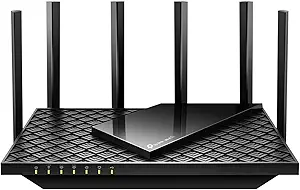 | Best for Gaming and Streaming – Tri-band WiFi 6E with 6 GHz band for low-latency connections | Max WiFi Speed: 5400 Mbps | WiFi Bands: 6 GHz, 5 GHz, 2.4 GHz | 6 GHz Speed: 2402 Mbps | VIEW LATEST PRICE | See Our Full Breakdown |
| TP-Link AX1800 WiFi 6 Router (Archer AX21) |  | Best Overall for Most Home Users | Technology: Wi-Fi 6 (802.11ax) | Bands: Dual Band (2.4 GHz and 5 GHz) | Total Bandwidth: 1.8 Gbps | VIEW LATEST PRICE | See Our Full Breakdown |
| TP-Link Dual-Band Wi-Fi 7 Router Archer BE230 |  | Best for Power Users and Future-Proofing | Wi-Fi Technology: Wi-Fi 7 | Speed (5 GHz): up to 2882 Mbps | Speed (2.4 GHz): up to 688 Mbps | VIEW LATEST PRICE | See Our Full Breakdown |
More Details on Our Top Picks
NETGEAR Nighthawk WiFi 7 Router (BE9300)
The NETGEAR Nighthawk BE9300 stands out for delivering blazing-fast WiFi 7 speeds up to 9.3Gbps, making it ideal for gamers and streamers who need high bandwidth. Its coverage of 2,500 sq. ft. surpasses many competitors like the TP-Link AXE5400, ensuring strong signals throughout large homes. However, it requires a separate modem, which could be a drawback for those seeking an all-in-one device. Compared to the TP-Link BE6500, it lacks integrated modem features but excels in raw speed and device support. Its tri-band WiFi and high device capacity support multiple streaming and gaming devices seamlessly. The main tradeoff involves needing a compatible modem and the higher price point. This pick makes the most sense for users who prioritize speed and coverage over integrated solutions or budget constraints.
Pros:- Blazing-fast WiFi 7 speeds up to 9.3Gbps for demanding applications
- Wide coverage area of 2,500 sq. ft. for large homes
- Supports up to 100 devices simultaneously
Cons:- Requires a separate modem for internet service
- Limited to U.S. use, no built-in modem included
Best for: Tech enthusiasts and large households needing the fastest WiFi 7 speeds for gaming, streaming, and video conferencing
Not ideal for: Basic internet users or those with smaller spaces who prefer an all-in-one, budget-friendly router
- Speed:up to 9.3Gbps
- Coverage:2,500 sq. ft.
- Internet Port:2.5 Gigabit
- Device Support:up to 100 devices
- Dimensions:4″ x 5.9″ x 9.8″
- WiFi Technology:WiFi 7, Tri-Band
Bottom line: Best suited for power users who need top-tier speed and coverage but are willing to manage separate modem setup.
NETGEAR Nighthawk AX2700 (CAX30) DOCSIS 3.1 Cable Modem & WiFi 6 Router
The NETGEAR Nighthawk CAX30 offers a compelling all-in-one solution, combining a DOCSIS 3.1 cable modem with a WiFi 6 router capable of speeds up to 1 Gbps. This makes it a flexible choice for cable internet users who want reliable multi-device coverage, similar in coverage to the TP-Link AC1200, but with the added convenience of a modem. Its WiFi 6 technology provides faster, more efficient wireless connections, supporting up to 25 devices simultaneously. Compared to the TP-Link BE6500, which is WiFi 7 and supports higher speeds, the CAX30 is more budget-friendly and easier to set up, but it cannot handle gigabit fiber connections or support ultra-high speeds. The main tradeoff involves its limited maximum internet speed and incompatibility with some providers like Verizon or AT&T. This device fits well for cable users seeking a combined modem/router at a reasonable price, with room for growth in speed requirements.
Pros:- Combines modem and router in one device for convenience
- Supports WiFi 6 for faster, more reliable wireless connections
- Supports multiple devices with extensive coverage
Cons:- Limited to cable internet providers; incompatible with fiber or DSL
- Maximum internet speed of 1 Gbps may limit future upgrades
Best for: Cable internet subscribers seeking a budget-friendly, all-in-one modem and router with solid WiFi 6 speeds
Not ideal for: Fiber or gigabit internet users requiring higher speeds or future-proofing with WiFi 7
- Model:CAX30
- Connectivity:DOCSIS 3.1
- WiFi Standard:WiFi 6 (AX2700)
- Max Internet Speed:up to 1 Gbps
- Coverage:up to 2,000 sq. ft.
- Concurrent Devices:25
Bottom line: Great for cable users wanting an affordable, all-in-one device with solid WiFi 6 performance.
TP-Link AC1200 Gigabit WiFi Router (Archer A6)
Best for Beginners – Easy setup with dual-band performance for small to medium homes
View Latest PriceThe TP-Link Archer A6 provides reliable dual-band WiFi with speeds up to 1200 Mbps, making it suitable for families who stream in HD or perform light gaming. Its four external antennas with Beamforming technology help extend coverage, comparable to the coverage of the TP-Link AXE75, but at a lower speed ceiling. This model is a practical choice for those new to home networking, with straightforward setup, but it relies on an external modem, limiting its plug-and-play convenience compared to integrated options. While it supports MU-MIMO and WPA3 security, the setup process may challenge non-technical users. The tradeoff is that it won’t support gigabit fiber or handle very high-speed plans as efficiently as WiFi 6 or WiFi 7 routers. This is ideal for users seeking a simple, affordable solution for smaller homes or less demanding internet plans.
Pros:- Easy setup suitable for beginners
- External antennas provide long-range coverage
- Supports MU-MIMO and WPA3 security
Cons:- Requires a separate modem for internet connection
- Limited to 1200 Mbps speeds, not ideal for gigabit plans
Best for: Home users new to networking or in smaller spaces needing reliable dual-band WiFi at an affordable price
Not ideal for: High-demand households or gigabit fiber subscribers requiring faster speeds and advanced features
- Speed:1200 Mbps (300 Mbps 2.4GHz + 900 Mbps 5GHz)
- Antennas:4 external with Beamforming
- Ports:4 Gigabit LAN
- Technology:MU-MIMO, OneMesh
- Security:WPA3
- Coverage:Long-range
Bottom line: Best for users new to home networking who want an affordable, reliable dual-band router for moderate internet use.
TP-Link BE6500 Dual-Band WiFi 7 Router (BE400)
The TP-Link BE6500 exemplifies the latest in WiFi 7 technology, offering speeds up to 5.764 Gbps on the 5 GHz band and covering up to 2,400 sq. ft. with six high-performance antennas. Its dual-band setup, combined with Multi-Link Operation, optimizes performance for multiple demanding devices, making it a strong choice for large homes. Compared to the NETGEAR BE9300, it offers similar high-speed capabilities but with a more consumer-friendly price point and easier setup options. Its robust security features, including HomeShield and VPN support, add to its appeal. The main downside is its high price and the need for compatible, WiFi 7-enabled devices to fully realize its potential. This router targets tech-savvy users who want cutting-edge performance and extensive coverage in a sleek package.
Pros:- Supports WiFi 7 for ultra-fast speeds and low latency
- Wide coverage of up to 2,400 sq. ft. with six antennas
- Advanced security features with VPN support
Cons:- High price point may be prohibitive for some users
- Requires compatible devices to leverage WiFi 7 speeds
Best for: Tech-savvy homeowners with high-speed fiber plans and multiple demanding devices seeking future-proof WiFi 7 technology
Not ideal for: Budget-conscious users or those with basic internet needs, as the premium price may not be justified
- Max WiFi Speed:up to 5764 Mbps
- WiFi Bands:6 GHz, 5 GHz, 2.4 GHz
- 6 GHz Speed:2402 Mbps
- Processor:Quad-Core 1.7 GHz
- Antennas:6 high-performance
- Coverage:Up to 2,400 sq. ft.
Bottom line: Ideal for users with high-speed fiber connections and a desire for cutting-edge WiFi 7 performance in a premium package.
TP-Link AXE5400 Tri-Band WiFi 6E Router (Archer AXE75)
Best for Gaming and Streaming – Tri-band WiFi 6E with 6 GHz band for low-latency connections
View Latest PriceThe TP-Link Archer AXE75 pushes the boundaries with WiFi 6E, supporting speeds up to 5.4 Gbps across three bands, including the new 6 GHz band for ultra-low latency gaming and streaming. Its OFDMA technology and quad-core CPU handle multiple devices efficiently, comparable to the NETGEAR Nighthawk AX2700 but with the added benefit of the 6 GHz band. The extensive coverage, thanks to three spatial streams and multiple antennas, makes it suited for large homes with many devices. However, its complexity might be overwhelming for casual users, and it requires a compatible modem for full internet access. The main tradeoff involves the higher cost and the need for compatible devices to fully benefit from WiFi 6E’s advantages. This router is best for tech-savvy gamers or streamers who demand the lowest latency and fastest speeds available today.
Pros:- Fast tri-band WiFi 6E speeds up to 5400 Mbps
- Supports 6 GHz band for ultra-low latency connections
- Handles multiple devices with OFDMA technology
Cons:- Requires compatible devices to fully leverage WiFi 6E
- Premium price and complex setup may challenge less technical users
Best for: Gamer households and streaming enthusiasts wanting the latest WiFi 6E benefits for demanding applications
Not ideal for: Users with basic internet needs or limited budgets, as its advanced features come at a premium
- Max WiFi Speed:5400 Mbps
- WiFi Bands:6 GHz, 5 GHz, 2.4 GHz
- 6 GHz Speed:2402 Mbps
- Processor:Quad-Core
- Memory:512 MB
- Coverage:Large homes with multiple devices
Bottom line: Best for high-performance gaming and streaming setups that can utilize WiFi 6E’s cutting-edge low-latency capabilities.
TP-Link AX1800 WiFi 6 Router (Archer AX21)
The TP-Link Archer AX21 stands out as the best overall choice for typical households seeking gigabit speeds, thanks to its support for Wi-Fi 6 and extensive coverage. It offers a balanced mix of speed—up to 1200 Mbps on 5 GHz—and reliable connectivity for multiple devices, which makes it an excellent upgrade from older dual-band routers. Compared with the TP-Link BE230 Wi-Fi 7 router, it doesn’t support the latest Wi-Fi 7 standard, but its compatibility with all major ISPs and solid security features make it more versatile for most users. The main tradeoff is that it omits support for the 6 GHz band, limiting future-proofing potential, and its performance can vary depending on environment and device placement. Overall, this pick makes the most sense for households prioritizing stable, high-speed Wi-Fi without the need for the absolute latest technology.
Pros:- Supports Wi-Fi 6 with faster speeds and improved capacity
- Good coverage with beamforming and high-gain antennas
- Handles multiple devices efficiently with OFDMA
- Works seamlessly with all major ISPs
Cons:- Lacks support for the 6 GHz band, limiting future upgrades
- Performance can fluctuate based on environment and device placement
Best for: Families who want reliable, fast Wi-Fi for streaming, gaming, and smart home devices without complexity.
Not ideal for: Tech enthusiasts eager for Wi-Fi 6E or Wi-Fi 7 features or those with very large properties needing extensive mesh setups.
- Technology:Wi-Fi 6 (802.11ax)
- Bands:Dual Band (2.4 GHz and 5 GHz)
- Total Bandwidth:1.8 Gbps
- Max Speed:up to 1200 Mbps on 5 GHz, up to 574 Mbps on 2.4 GHz
- Antennas:4 high-gain antennas
- Security:Supports VPN Server (Open VPN, PPTP)
Bottom line: This router is ideal for most home users seeking solid, future-ready Wi-Fi 6 performance at an accessible price.
TP-Link Dual-Band Wi-Fi 7 Router Archer BE230
The TP-Link Archer BE230 pushes the boundaries with Wi-Fi 7, making it the top pick for users who want the fastest possible internet speeds and extensive coverage, especially in larger homes. It supports impressive speeds of up to 2882 Mbps on 5 GHz, far surpassing the AX1800’s capabilities, and offers mesh support to extend coverage up to 2,000 sq. ft. — ideal for those with demanding devices or smart home setups. Compared with the AX1800, this router is better suited for tech-savvy users seeking cutting-edge Wi-Fi technology, though it requires a separate modem and doesn’t support the 6 GHz band yet. Its multiple gigabit ports and easy management via the Tether app make it straightforward for advanced users, but environmental factors can impact performance, and its high speed is best realized with compatible devices. This makes it well-suited for users who want to future-proof and maximize wired and wireless connectivity in a large space.
Pros:- Supports Wi-Fi 7 for blazing-fast wireless speeds
- Extensive coverage up to 2,000 sq. ft. with mesh options
- Multiple gigabit ports for fast wired connections
- Easy setup and management via Tether App
Cons:- Does not support the 6 GHz Wi-Fi band yet
- Performance may vary depending on environment and obstacles
- Requires a separate modem for internet connectivity
Best for: Power users and early adopters aiming for the latest Wi-Fi standard with extensive coverage and high-speed wired connections.
Not ideal for: Casual users or those with small apartments who don’t need Wi-Fi 7’s maximum speeds or extensive coverage.
- Wi-Fi Technology:Wi-Fi 7
- Speed (5 GHz):up to 2882 Mbps
- Speed (2.4 GHz):up to 688 Mbps
- Ports:1×2.5G WAN/LAN, 3×1G LAN
- Processor:Quad-core 2.0 GHz
- Coverage:up to 2,000 sq. ft.
Bottom line: This router is designed for users who want the best of Wi-Fi 7 technology and extensive coverage, especially in larger or demanding homes.

How We Picked
In selecting these routers, I prioritized real-world performance metrics, such as maximum speeds and device handling capacity, that matter for gigabit plans. Usability factors like setup complexity and management features were also considered, ensuring the options cater to both tech-savvy users and novices. Build quality, future-proofing with WiFi 6/6E/7, and port options played a role in the rankings. I aimed to balance value against premium features, making sure each model offers a distinct role—whether for overall performance, budget, or specific needs—so readers can find the best fit for their household or office setup.Factors to Consider When Choosing Best Router For Gigabit Internet
Choosing the right router for gigabit internet involves understanding several key factors. Beyond raw speed, coverage area, device capacity, and security features significantly impact your experience. Investing in a router with WiFi 6 or WiFi 7 ensures future compatibility as more devices support these standards. It’s also worth considering port options for wired devices, especially if you want stable, high-speed connections for gaming or streaming. Balancing these features against your budget and home size helps prevent overpaying or ending up with a router that’s underpowered for your needs.Speed and WiFi Standards
For gigabit internet, selecting a router that supports WiFi 6 or WiFi 7 is essential. These standards deliver the speeds required for maximum gigabit plans, especially when multiple devices are connected. WiFi 7, in particular, offers multi-gigabit speeds and lower latency, making it ideal for future-proofing. However, keep in mind that your actual internet speed also depends on your service provider and plan. Investing in a router with the latest standard ensures you’re getting the most out of your gigabit connection, but it may come at a higher cost.
Coverage Area and Antenna Design
Home size and layout heavily influence your router choice. Larger homes benefit from routers with multiple high-gain antennas or mesh capabilities, like the TP-Link BE6500, which can cover up to 2,400 sq. ft. In smaller apartments, a more modest router such as the TP-Link AX1800 might suffice. Remember that a router’s coverage isn’t just about raw range but also about signal stability across walls and floors. Overestimating your needs can lead to unnecessary expenses, so consider your home’s size when selecting a model.
Device Capacity and Network Management
Think about how many devices will connect simultaneously. Routers like the NETGEAR Nighthawk BE9300 support up to 90 devices, making them suitable for busy households or smart homes with many gadgets. Lower-capacity models may struggle under heavy loads, resulting in slower speeds or dropped connections. Advanced management features like QoS (Quality of Service) and parental controls can help prioritize bandwidth and enhance security. Matching your device count with a router’s capacity prevents bottlenecks and ensures consistent performance.
Ports and Wired Connectivity
While WiFi is the primary concern, wired connections remain important for gaming, streaming, or work-from-home setups needing stability. Multi-Gig ports, such as 2.5Gbps Ethernet ports found on premium models like the TP-Link BE6500, allow for faster wired connections. Check if the router has enough ports to support your wired devices without needing additional switches. Also, consider USB ports if you want to connect network storage or printers directly to your router for convenience and faster access.
Security and Firmware Updates
Security features are vital as smart homes and connected devices expand. Routers with integrated security services like TP-Link HomeShield or NETGEAR Armor offer protection against malware and intrusion attempts. Regular firmware updates are essential to patch vulnerabilities and improve performance over time. Investing in a router with manufacturer support and updates provides peace of mind, especially when handling sensitive data or multiple users.
Frequently Asked Questions
Do I need a WiFi 6 or WiFi 7 router for gigabit internet?
While a WiFi 6 router can adequately support gigabit speeds for most households, a WiFi 7 router offers higher potential speeds, lower latency, and better capacity for multiple devices. If your budget allows, opting for WiFi 7 future-proofs your network as more devices adopt the latest wireless standards. However, ensure your devices support these standards to take full advantage of the benefits. For most current gigabit plans, WiFi 6 provides a good balance of performance and cost.Is a multi-gig port necessary for gigabit internet?
A multi-gig port, like a 2.5Gbps Ethernet port, isn’t strictly necessary for gigabit internet, but it provides a valuable upgrade for wired connections. It allows faster, more stable links to devices such as gaming PCs, NAS drives, or streaming servers. If you have or plan to get such devices, choosing a router with a multi-gig port ensures you won’t bottleneck your wired speeds. For typical browsing, streaming, and smart home uses, a standard Gigabit port is sufficient.How important is coverage for gigabit internet routers?
Coverage is essential to maximize your gigabit internet experience across your entire home. A router with inadequate range can result in dead zones or weak signals, which diminish speed and reliability. Larger homes or those with thick walls benefit from mesh systems or routers with multiple antennas designed to extend coverage. Proper placement—central and elevated—also plays a role. Avoid underestimating your space needs, as it can lead to frustration and underperformance.Should I prioritize security features when choosing a router?
Yes, security should be a key consideration, especially with the growing number of connected devices. Routers with integrated security services, automatic firmware updates, and guest networks help protect your network from external threats. Investing in a model with robust security features can prevent data breaches and safeguard personal information. Remember, a high-speed router with poor security is less valuable if your network becomes vulnerable.Is setup complexity a concern for choosing a gigabit router?
Setup complexity varies among models; some routers offer simple app-based setups suitable for beginners, while others with advanced features require more technical know-how. For most users, a user-friendly interface and guided setup process are worth prioritizing. Consider your comfort level with networking technology—if you prefer a straightforward experience, choose a router with clear instructions and good support. Advanced users might appreciate customizable options, but ease of setup remains a common deciding factor.Conclusion
For most users seeking a reliable, fast, and future-proof network, the NETGEAR Nighthawk WiFi 7 Router (BE9300) delivers exceptional performance and cutting-edge features. Budget-conscious households will find the TP-Link AX1800 WiFi 6 Router (Archer AX21) offers solid gigabit support without breaking the bank. Those with larger homes or many devices should consider the TP-Link BE6500 for its coverage and device capacity. Beginners or less tech-savvy users benefit from routers with simple setup, like the TP-Link AX1800, while power users needing maximum speed and security should lean toward premium models like the NETGEAR Nighthawk BE9300. Tailor your choice based on your space, device count, and budget to get the best experience with gigabit internet.Fall Picks
fall essentials
As an affiliate, we earn on qualifying purchases.